What GDPR, HIPAA, GLBA, and NIST 800-88 expect when a hard drive reaches end of life, and what more than $155 million in penalties and settlement costs can teach organizations about secure disposal.
In September 2022, the SEC hit Morgan Stanley Smith Barney with a $35 million fine for how it handled old hard drives. You might think it was a hack or insider trading, but the problem was much more basic. Thousands of decommissioned devices passed through an inadequately controlled disposal process, and some were eventually resold online with customer data still accessible.
Morgan Stanley also faced a $60 million OCC penalty and a $60 million class action settlement tied to the same failure. Put it all together, and the cost of getting hard drive disposal wrong went past $155 million.
The failure went beyond the sanitization method itself. Morgan Stanley lacked sufficient oversight of the disposal process, including reliable tracking and evidence showing what had happened to the devices.
That is where hard drive destruction compliance extends beyond the sanitization method itself. Organizations need a defensible process showing how data-bearing assets were handled, sanitized, verified, and ultimately disposed of. A documented chain of custody provides evidence that those controls were followed.
Key Takeaways
- The appropriate sanitization method, whether Clear, Purge, or Destroy, depends on the media, data sensitivity, and intended disposition of the drive.
- Compliance also depends on the process surrounding sanitization, including asset tracking, secure handling, verification, and documentation.
Why do companies still default to physical hard drive shredding?

Usually, a compliance team removes old hard drives by shredding, crushing, or melting them to make sure nobody can ever use them again. Many organizations assume destroying the hardware is enough to meet their legal obligations, but that is not always true or efficient.
Data protection regulations generally do not require physically destroying every old drive. The General Data Protection Regulation (GDPR), a strict privacy and security law created by the European Union (EU), does not include that requirement, nor does HIPAA (Health Insurance Portability and Accountability Act). Gramm-Leach-Bliley Act, the same law at the center of the Morgan Stanley case, also instructs the same.
However, simply saying we destroyed it does not prove secure data destruction, it requires a process behind it and a record to back it up.
What GDPR expects when you retire old hard drives
GDPR does not tell organizations to shred, crush, or overwrite a hard drive using a particular method. Instead, several provisions shape how retired data-bearing assets should be handled. Article 5 establishes principles including storage limitation, security, and accountability. Article 17 provides a right to erasure in certain circumstances, while Article 32 requires appropriate technical and organizational measures to protect personal data.
The area that often gets missed is Article 5(2), the accountability principle. A company can erase the data properly and still have a problem if it has nothing to show for it. No record means no way to prove the job was actually done.
GDPR can also apply outside Europe. Organizations established elsewhere may fall within its scope when they offer goods or services to people in the EU or monitor their behavior. US companies that offer goods or services to people in the EU or monitor their behavior must comply with GDPR regardless of where their servers reside.
Which data privacy laws apply to hard drive disposal beyond GDPR?

In the US, the updated GLBA Safeguards Rule specifically requires financial institutions to implement documented processes for secure disposal of customer information. These disposal policies fall within a larger, risk-based security program initiated by an appropriate Qualified Individual.
FACTA takes a similar approach, requiring disposal methods that are reasonable for the sensitive data. Meanwhile, HIPAA focuses on reasonable safeguards rather than prescriptive technical steps. It requires covered entities to implement policies that render protected health information unusable or inaccessible upon disposal, without dictating a specific destruction method.
Similarly, Europe’s WEEE Directive, which puts responsibility for hardware on producers even after it leaves the business.
The technical standard behind the paperwork
If there is one benchmark companies tend to fall back on, it is NIST Special Publication 800-88. It breaks storage media sanitization into three options: Clear, Purge, and Destroy. The appropriate method depends on factors such as the sensitivity of the data, the type of media, and whether the device will be reused or retired.
NIST updated the guidance in September 2025 with Revision 2. The new version covers scenarios and technology the 2014 edition could not really account for, including encrypted systems, cloud environments, and solid-state storage devices. So a policy that still relies on Rev. 1 without a clear justification may be based on outdated guidance.
Organizations also frequently reference the legacy DoD 5220.22-M standard. It was designed around traditional spinning hard drives, where data could be overwritten sector by sector. SSDs are different. Wear-leveling moves data around behind the scenes, meaning the operating system cannot reliably reach every cell.
That is why NIST 800-88 points to methods such as cryptographic erase for suitable flash storage. Using an old method on the wrong type of drive does not make a policy more secure. It just adds detail while leaving a real compliance gap underneath.
What full hard drive destruction compliance looks like on the ground
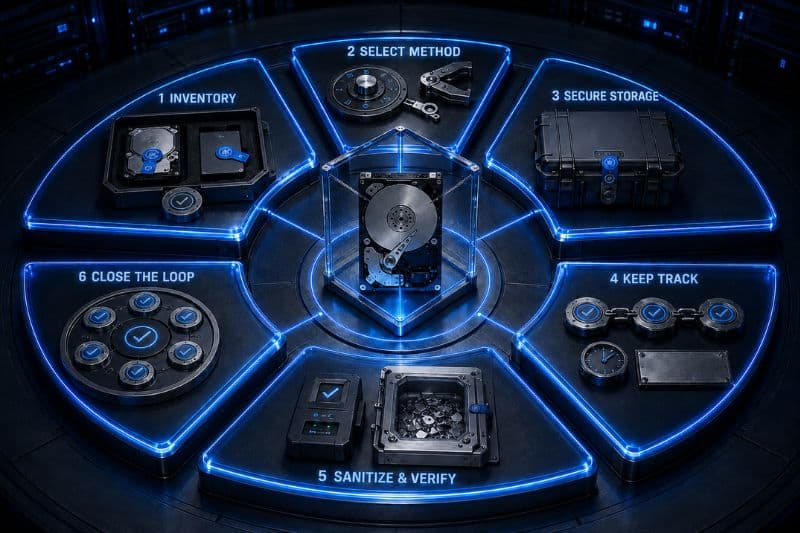
Compliant disposal is more than a simple process where you perform a few steps and shred a pile of old drives. There needs to be a clear process behind it, with records showing what happened to each device:
1. Start with an inventory
Before anyone touches a drive, make a list of everything being retired. Include the asset ID, serial number, drive type such as HDD or SSD, and the system the drive came from. This gives the team something to check against later and makes it much harder for a drive to simply disappear from the process.
2. Decide how each drive should be sanitized
Not every drive needs the same treatment. First, figure out how sensitive the data is and what will happen to the drive afterward. Drives that will stay inside the organization may only need a logical overwrite, known as Clear. Drives leaving the organization may need Purge, such as cryptographic erasure or block-level overwriting. If the drive cannot be safely reused, or the data is particularly sensitive, Destroy may be the better option. NIST SP 800-88 provides the framework for making this decision.
3. Keep the drives somewhere secure
A solid disposal process is pointless if the drives sit in an unlocked room for two weeks beforehand. Store them in a restricted area or a tamper-evident container, with access limited to people who are authorized to handle them.
4. Keep track of who handles them
Every time the drives change hands, record it properly with specific details. A simple chain-of-custody record should show who received the drives, when they received them, when they were transferred and who took responsibility next. This becomes especially important when an outside disposal company is involved.
5. Sanitize the drives and check the result
Carry out the chosen wiping or destruction method, then make sure it actually worked. For a software-based wipe, verification tools can confirm that the data was removed. For physical destruction, inspect the resulting material to make sure the drives were actually destroyed as required.
6. Close the loop
Lastly, go back to the original inventory and account for every drive. If 500 drives went into the process, there should be a clear record for all 500. Any missing drive, failed wipe, or other discrepancy should be investigated and resolved before the job is considered finished.
Moving from manual tracking to verified compliance
Managing hard drive disposition across large asset volumes can create gaps in tracking, custody, sanitization, and reporting. Reconext’s ITAD services support data-bearing assets through secure logistics, serialized tracking, data sanitization or destruction, and reporting through final disposition. The result is a traceable record showing how assets moved through the process and how each disposition outcome was handled.
Talk to Reconext about building a secure, traceable hard drive disposition program.