Even organizations with well-defined IT asset management processes can still struggle with inaccurate asset records, policy gaps, and inconsistent controls. Without a structured audit process, these issues often remain undetected until an audit uncovers them.
These gaps matter most when enterprise hardware approaches retirement. At that point every device has to answer four questions. Is it ready for disposition? Where is it sitting? Who owns it? Does it hold sensitive data? Weak records leave all four open.
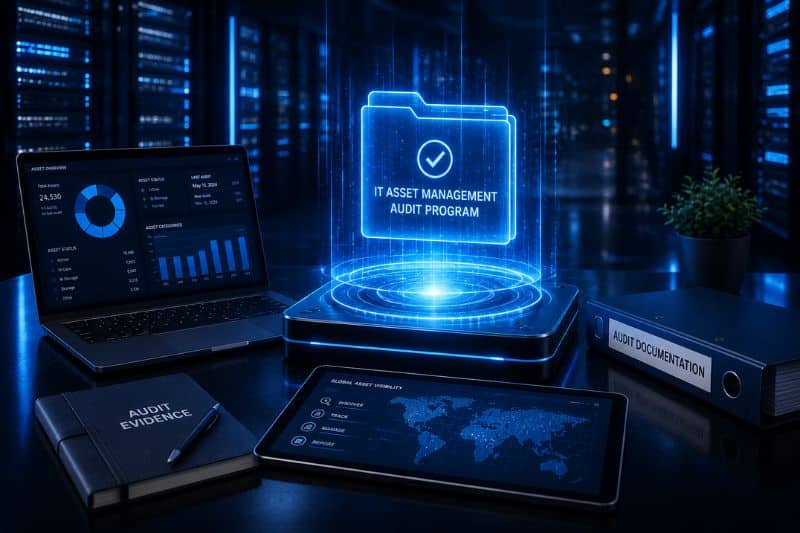
An IT asset management audit program gives teams a repeatable way to check policies, processes, and records against what is actually happening in the environment. Each cycle tests whether lifecycle controls are holding, shows where compliance is slipping, and flags what needs fixing before equipment enters the IT asset disposition process.
This article walks through how to plan and run an ITAM audit program that keeps asset records accurate and makes hardware retirement secure and fully documented.
Key Takeaways
- Five things hold an audit program together. Clear objectives, automated discovery, physical verification, data reconciliation, and remediation that keeps running after the report is filed.
- Good audit data feeds ITAD directly. It flags what is nearing retirement, confirms who owns each device and where it sits, and marks the equipment holding data.
- Linking audits to disposition closes the loop. Chain of custody gets tighter, compliance evidence gets stronger, and every asset ends its life with a complete record behind it.
Why Organizations Need to Conduct ITAM Audits
Asset data feeds more than the IT team. Finance reports on it, security relies on it to know what sits on the network, and refresh planning and hardware retirement run off the same records. All of it breaks down when the data drifts, and drift happens fast without a structured review.
An IT asset audit catches that drift. It gives a systematic read on how asset management is actually being run, and it creates a reliable starting point for IT asset disposition.
Identify ghost assets
Ghost assets are the items still on the books after they stopped being used. Some were lost. Some were retired without anyone closing the record. Others sit in a storage room nobody has opened in two years.
Correcting these records prevents inflated maintenance costs and inaccurate financial reporting. It also helps ensure that retired hardware is included in the organization’s ITAD process rather than remaining untracked in storage or at an inactive location.
Verify ownership and compliance
Check asset and ownership records against internal policy, vendor agreements, and applicable regulations. This matters most right before disposition. A leased machine, a customer-owned unit, or an asset under legal hold cannot be sold or destroyed, so confirm ownership on every line before the batch leaves.
Mitigate cybersecurity risks
Audits surface the machines security teams did not know about. Unmanaged endpoints, unpatched systems, and anything holding data all widen the attack surface while staying invisible in the inventory.
The audit should also flag every asset that needs secure data sanitization before it leaves the building. Laptops, desktops, servers, and storage arrays are the obvious candidates. Mobile devices and some network equipment quietly retain configuration data too.
Identifying these assets early allows the organization and its ITAD provider to plan the appropriate data-erasure or physical-destruction process.
Improve hardware retirement planning
Use validated asset age, condition, support status, and performance data to forecast refresh cycles and determine which equipment is approaching the end of its useful life.
This helps organizations avoid retiring usable equipment too early or keeping unsupported hardware in service longer than intended. It also sharpens the forecast for future ITAD volumes, collection locations, and processing requirements.
Support reuse and value recovery
Condition, configuration, age, and whether the unit still works: those four data points decide whether an asset gets redeployed internally, refurbished, sold, or stripped for parts.
The audit gives a first read on what an asset is still worth. An ITAD provider confirms it by wiping the data, testing the unit, grading it, and checking what the market will pay.
Reinforce governance and accountability
Clean records earn their keep in four places: internal reviews, regulatory assessments, executive reporting, and ITAD reconciliation at the end of the lifecycle.
A verified inventory becomes the opening entry in the disposition record. Everything after it gets matched back: what the provider received, what was erased, what sold, what was recycled, and the certificates closing each line out.
A well-executed audit program turns asset management into a governance discipline and makes the handoff from active use to secure retirement far cleaner.
Key Steps of an ITAM Audit Program
IT asset audits tend to follow a similar path, though scope and method shift with business objectives, compliance requirements, asset volumes, and planned disposition activity. The eight steps below apply to most environments.
1. Define Audit Scope and Objectives

An ITAM audit should begin with a clearly defined scope and measurable objectives. Without them, audits sprawl well past their original purpose and burn time while producing inconsistent results.
Start by determining which environments, business units, locations, and asset categories will be included.
Depending on the audit’s purpose, this may cover:
- End-user devices
- Servers and storage equipment
- Network infrastructure
- Cloud and virtual resources
- Software licenses
- Equipment stored at remote or inactive locations
- Assets approaching retirement
- Hardware included in a refresh or decommissioning project
Objectives should tie back to something the business actually needs, whether that is shutting down unused resources, proving license compliance, testing lifecycle controls, or building an accurate asset list for an ITAD provider.
IT, finance, procurement, security, and facilities teams should agree on the required data, reporting needs, and audit priorities. This helps determine whether the audit should cover the entire IT environment or focus on specific high-risk areas or retirement events.
2. Assemble a Cross-Functional ITAM Team
Building a cross-functional team ensures the audit covers every stage of the asset lifecycle and produces reliable results.
Assign responsibilities from the start. One group walks the floor and verifies hardware. Another works through software licenses and financial records. A third owns security requirements and ownership details. Someone has to own the findings once they land.
Pull in other departments where the audit touches their territory:
- Finance validates asset values, depreciation schedules, and book records.
- Security and privacy set the data-handling requirements.
- Procurement confirms ownership, lease terms, warranties, and supplier obligations.
- Facilities tracks down equipment sitting in warehouses, repair areas, and forgotten storage rooms.
For large or complex retirement programs, an experienced ITAD provider is worth pulling in early. They set the collection data format, the chain-of-custody requirements, the sanitization standard, and what the final report has to show.
3. Deploy Automated Discovery and Collection

Automated discovery gives a current view of the environment and catches what manual inventories miss. Point the tools at cloud platforms, on-premises infrastructure, endpoints, servers, and network-connected devices.
This helps identify:
- Unmanaged endpoints
- Unauthorized devices
- Assets missing from standard inventory records
- Devices assigned to inactive users
- Hardware that has not connected recently
- Equipment approaching the end of support
- Idle virtual machines and inactive cloud services
Feed discovery data straight into the CMDB or asset management platform so records stay aligned with the live environment. That gives the rest of the audit something reliable to work from.
Discovery has a blind spot worth planning around. A network scan will never see a machine that is boxed up, broken, or already unplugged, and those units still have to go through the ITAD process. Physical verification is what catches them.
4. Implement and Verify Tagging Standards
Consistent asset tagging improves inventory accuracy and makes audit findings easier to validate.
Every asset should follow a standardized tagging structure that captures key details such as:
- Assigned owner or user
- Department and cost center
- Environment and Physical location
- Asset category
- Ownership status
- Lifecycle stage
Where possible, automate tag enforcement so assets with missing or inconsistent information surface on their own. Barcode or QR scanning cuts data-entry errors during field audits, and the same naming standards should carry across cloud platforms and on-premises infrastructure.
Standardized identifiers pay off during ITAD. The tag and serial number carry the asset through the collection manifest, serialized receiving, the erasure record, and the final disposition report. One number ties the whole chain together.
Missing, damaged, or duplicated identifiers should be resolved before equipment leaves the organization’s control.
5. Execute Physical Verification and Condition Scoring
Physical verification confirms that asset records match the equipment actually in use or storage. Auditors inspect assets on-site and compare them against inventory records using barcodes, QR codes, or serial numbers.
This helps identify:
- Missing assets
- Misplaced equipment
- Duplicate records
- Incorrect locations
- Unrecorded hardware
- Assets already retired but still listed as active
- Equipment left in storage
Confirm ownership and location at the same time to keep the chain of custody accurate. Where it helps, pull operating system or hardware health data alongside the physical inspection to see which systems are close to the end of their useful life.
Where appropriate, organizations should supplement physical inspections with operating system or hardware health data. This provides a more complete view of asset performance and helps identify systems approaching the end of their useful life.
Assets in good condition may be candidates for redeployment, refurbishment, or resale. Damaged equipment may be better suited for repair, parts harvesting, or recycling. Treat that call as provisional until the ITAD provider has tested and graded the unit.
6. Map Configuration Item (CI) Interdependencies
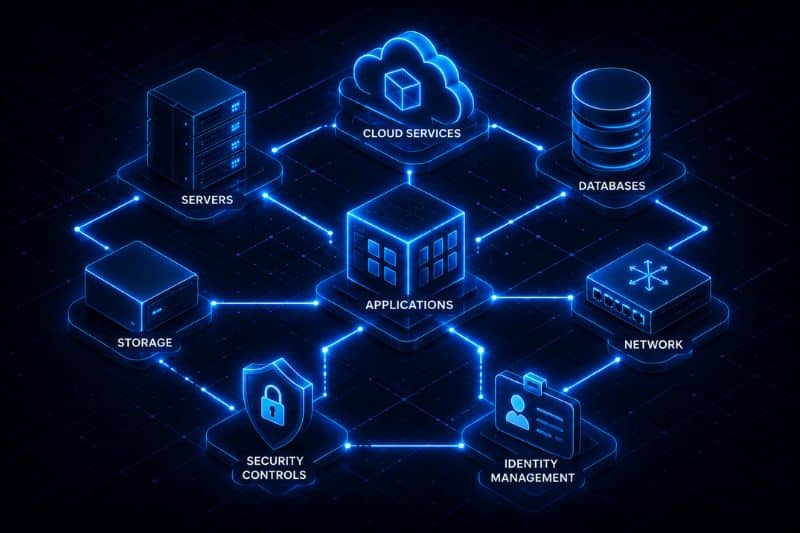
Almost nothing in the estate runs alone. Servers depend on storage. Applications depend on databases. All of it depends on the network sitting underneath.
Mapping these relationships shows where a change or a hardware removal could ripple outward. It also feeds disaster recovery planning by making clear which assets carry critical operations.
Document the links between configuration items during the audit. Compute, storage, and networking are the obvious ones. Security controls and identity systems matter just as much, because pulling one server can quietly break authentication somewhere else.
This visibility helps identify hidden risks such as:
- Outdated credentials
- Unsupported components
- Single points of failure
- Unresolved data dependencies
- Systems requiring migration
- Assets supporting active business services
Before equipment enters the ITAD process, decide which assets can be decommissioned now and which have to stay live until data, applications, or services have moved. That sequencing is what keeps a decommission from taking a running service down with it.
7. Reconcile Data and Update Depreciation
Once the audit data is in, reconcile it against financial records, procurement information, lease records, and the existing inventory. This confirms that every recorded asset exists and reflects its current status. Running the exercise during a quieter operational period keeps the target from moving.
Reconciliation helps identify:
- Ghost assets and Duplicate records
- Software licenses that no longer match actual deployments
- Incorrect ownership information or location data
- Leased and owned hardware
- Equipment with remaining book value or warranty coverage
- Hardware subject to return obligations
Clearing these discrepancies tightens the inventory and usually takes cost out with it, since support contracts, licenses, insurance, and tax often keep running against equipment that was scrapped or reassigned long ago.
Then update the financial records. Asset values, useful life, depreciation schedules, and retirement status should reflect actual condition and usage, which keeps reporting accurate and ensures only authorized assets enter the ITAD process.
8. Analyze Insights and Remediate Findings
Start with the gaps between the inventory and what the audit actually found. That comparison surfaces missing equipment, hardware nobody is managing, ownership fields pointing at people who left, and units close enough to retirement to plan around.
Rank findings by business impact. Anything involving a data-bearing device goes to the top of the list, followed by unresolved dependencies and assets with no clear owner. Assign the work through your ITSM platform and track it to completion.
Document the results in a report or dashboard covering major findings, completed actions, outstanding risks, and recommended improvements.
For assets moving into disposition, turn the verified data into an ITAD-ready collection manifest. Each line needs:
- Asset tag and serial number
- Physical location
- Ownership status
- Data sanitization requirement
- Condition grade
- Any special handling instructions
Once processing is done, match the original inventory against what comes back from the provider. Receiving records, erasure results, recovery statements, and certificates of disposition should account for every line.
Choosing Between Internal and External ITAM Auditors

The difference comes down to who runs the audit and who the findings are for.
| Internal audit | External audit | |
| Run by | In-house audit, compliance, IT, or ITAM teams | Independent third-party firms |
| Findings used for | Tightening controls, fixing inventory accuracy, cutting cost, planning lifecycle decisions | Regulatory review, certification, financial reporting, contractual obligations |
| Best suited to | Validating inventory, closing record gaps, preparing hardware for retirement | ISO 27001, SOC 2, and anything needing independent assurance |
Both have a place. Which one fits depends on the objective, the resources on hand, and how large the asset environment is. Organizations preparing for a certification such as ISO 27001 or SOC 2 usually need the independent assessment. An internal audit is enough when the goal is to validate inventory, close record gaps, or get hardware ready for retirement.
Internal capability matters too. Teams without experienced ITAM staff or established audit procedures usually get further with external specialists.
For a major refresh, an office closure, or a data center decommission, the strongest setup pairs internal asset knowledge with external audit support. Hand the verified results to the ITAD provider and collection, sanitization, testing, resale, and reporting all start from the same source of truth.
Conclusion
Structured ITAM audits strengthen governance and improve asset visibility, and they settle the questions that matter before anything leaves the building. Who owns the asset, where it is, what condition it is in, and whether it holds data. With those answered, chain of custody holds up and the reuse or recycling call gets made on evidence.
When assets reach the end of their useful life, Reconext takes them from verified inventory to secure disposition. That covers serialized tracking, certified data sanitization, functional testing, value recovery, and responsible recycling.
Explore Reconext’s ITAD services to see how organizations retire IT assets securely and responsibly.
FAQs
What is an IT audit program?
An IT audit program is a structured framework for planning, running, and documenting IT audits. It sets the scope, the procedures, the timelines, and the evaluation criteria so every cycle assesses assets, controls, and compliance the same way.
What are the key objectives of an IT asset audit?
An IT asset audit exists to confirm that records are accurate, that the organization is compliant, and that controls are working. Along the way it verifies ownership, checks lifecycle records against reality, and reduces both security and financial exposure.
How often should organizations conduct IT audits?
Organizations should audit IT assets at least once a year. High-risk environments and regulated industries need it more often. Compliance obligations, the size of the estate, and how much the organization has changed since the last cycle all push the frequency up.
What are common issues found during IT audits?
The most common finding is an inventory that no longer matches reality: missing records, duplicates, and hardware nobody is tracking. Software license non-compliance shows up often too. Weak lifecycle controls, inconsistent tagging, and outdated documentation round out the usual list.