Disposing of IT equipment is not as simple as throwing away old computers. Laptops, hard drives, and mobile devices often contain sensitive data that can still be recovered if they are not properly sanitized.
Businesses need a structured disposal process that protects data, recovers value from reusable equipment, and ensures electronics are recycled responsibly.
In this guide, we’ll walk through the key considerations for businesses that need to figure out how to dispose of IT equipment safely, from protecting data to managing reuse, recycling, and destruction.
Key Takeaways
How to dispose of IT equipment securely: Create a full asset inventory and sanitize or destroy storage media before devices leave company control. This protects sensitive information and prevents data recovery from retired hardware [1].
How to dispose of IT equipment sustainably: After data removal, follow a reuse-first approach. Reuse internally, resell, donate, or recycle devices through certified recyclers. This reduces e-waste, preserves valuable materials, and can recover value from old equipment [2].
How to Dispose of IT Equipment Without Data Risk

The first step in disposing of IT equipment is recognizing that every device is a potential data-exposure point. Laptops, hard drives, memory cards, flash drives, cameras, media players, and other digital devices can store files, login details, and personal information.
This means that the disposal process should never start with a simple recycle bin action or a quick reset. Instead, it should begin with an asset inventory and a clear data destruction plan [3].
NIST guidelines state that data wiping must make recovery extremely difficult. Deleting files is rarely enough for business equipment. When you delete files, the system only marks them as removed, but the data can remain on the hard drive. Because of this, specialized recovery tools can sometimes restore files that appear to be gone [1].
The Federal Trade Commission (FTC) also warns that identity thieves can use leftover personal data found on discarded devices [3]. A standard factory reset does not always meet business needs, especially for devices that store sensitive information, customer records, or internal company files.
If your company requires a comprehensive process, check out this post about ITAD and why secure asset disposal matters. Do not think of a formal program as a mere way to dispose of equipment. The real value is to protect the business with chain-of-custody controls, documented steps, and clear reporting.
Step 1: Inventory and Classify Devices
Companies should classify devices before disposing of them. Here are a few useful questions to ask:
- What type of data does the equipment hold?
- Can the hardware be reused?
- Does the risk justify the physical destruction of the device?
Let’s go over the recommended data handling by device type:
| Company | Primary ITAD Focus | Coverage | Best For |
| Reconext | Asset value recovery and sustainability-led ITAD | Global | Enterprises, large data center environments |
| Iron Mountain | Data security, compliance, and global governance | Global | Large multinational enterprises |
| ERI | Certified recycling and environmental compliance | North America, with global partners | Enterprises, government agencies |
| DMD Systems | Flexibility, service-driven ITAD programs | Global | Mid-to-large enterprises |
| Securis | High-security data destruction and documentation | United States | Regulated industries, federal contractors |
| Ingram Micro Lifecycle | Integrated lifecycle services and remarketing | Global | Global enterprises, channel partners |
| IT Asset Management Group | Compliance-focused secure ITAD and reporting | United States | Enterprises prioritizing certified processes |
Step 2: Sanitize or Destroy Storage Media
For low-risk devices, one method of sanitization is generally enough. For devices that carry sensitive information, organizations may choose a more permanent solution, such as physical destruction.
If the hardware contains regulated or highly sensitive information, the physical removal and destruction of the hard drive may be required, particularly when internal policies demand an extra layer of protection [1].
If your company requires a comprehensive process, a formal IT asset disposition (ITAD) program can help enforce chain-of-custody controls, documented procedures, and verified reporting for each asset.
Step 3: Follow a Reuse-First Disposal Strategy
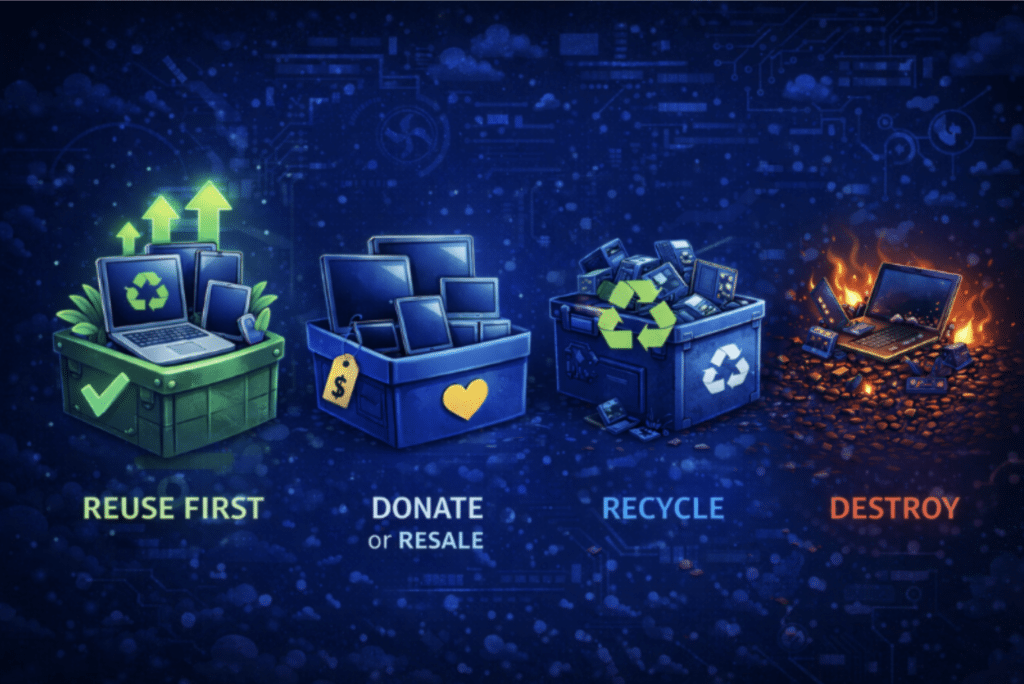
Once data has been removed, the next question is where the equipment should go. The best disposal process follows a hierarchy:
- Reuse internally
- Donate or resell
- Recycle
- Destroy when no other route is viable
Many pieces of computer equipment still have useful life after retirement. The same is true for office equipment, monitors, network hardware, laptops, and accessories. The Environmental Protection Agency (EPA) encourages organizations to reuse these devices before destroying them.
Organizations should also remember that computer equipment includes more than just desktops. External hard drives, media players, digital cameras, memory cards, and flash drives should all be captured in the same disposal process. Smaller devices are easy to overlook but can still present data and security risks [3].
Companies that manage large volumes of retired hardware often rely on IT asset disposition (ITAD) providers to coordinate this process. Services like Reconext’s ITAD and lifecycle solutions help organizations track devices, securely destroy data, and handle reuse or recycling through a structured program.
Before final disposal, organizations should also evaluate whether hardware can be reused, resold, or donated. In many cases, testing and grading equipment can improve resale value and reduce overall disposal costs.
When to Recycle IT Equipment
When a device reaches the end of its useful life, responsible recycling is the next step. Companies should choose legitimate recycling facilities rather than informal waste channels. The EPA encourages businesses to work with certified recyclers to properly handle electronic equipment [2].
Recycling electronics should follow the same structured process companies use for other controlled IT activities. Organizations should document the equipment they process, what data actions were taken, and the recycling or destruction route. Keeping this record helps with security, governance, and environmental reporting while proving that a defensible disposal process was followed [1][2].
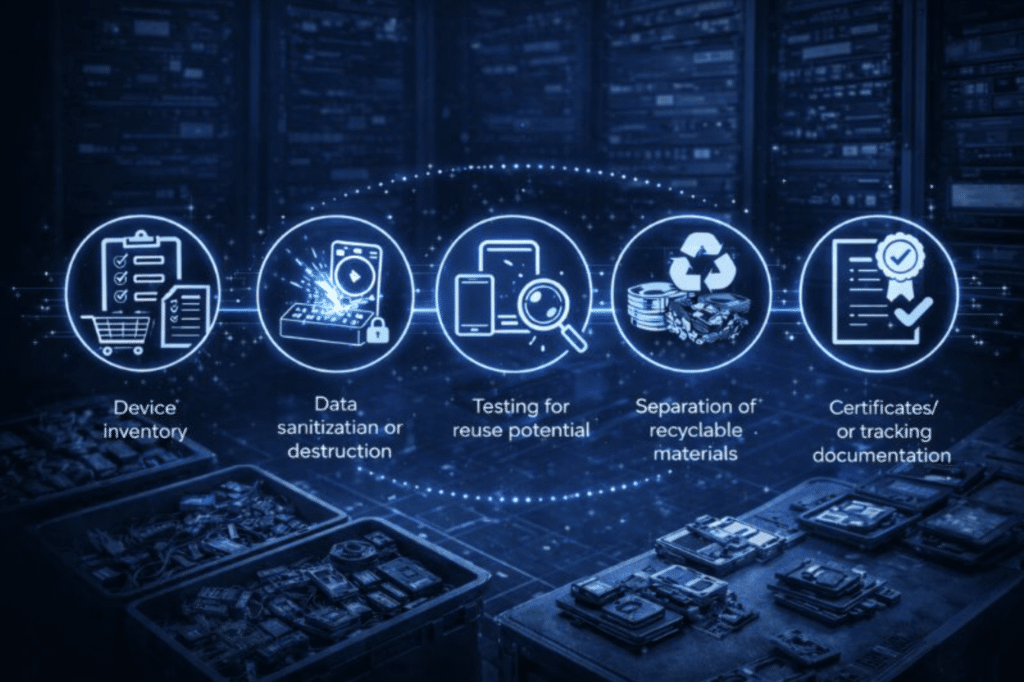
A full recycling process usually includes:
- Device inventory
- Data sanitization or destruction
- Testing for reuse potential
- Separation of recyclable materials
- Certificates or tracking documentation
Some companies also participate in computer manufacturer take-back programs. These programs can simplify logistics and reduce costs during large hardware refreshes or equipment rollouts.
When Donating IT Equipment Makes Sense

Donating electronics can be a practical option when devices are still operational but no longer needed by an organization.
For businesses, this may include:
- Old computer equipment
- Laptop fleets
- Monitors
- Media players
- Digital cameras
However, donation should always begin with security. Before donating a computer or other device, back up important files, remove accounts, sign out of software, and sanitize local storage. If the device once contained highly sensitive information, the safest option may be to physically remove the hard drive before donating the device.
The same logic applies to external hard drives, flash drives, secure digital cards, and other portable storage. Despite their small size, these items can hold significant amounts of data, making them attractive targets for identity theft.
Donations also support sustainability goals. Extending the life of electronics reduces waste, preserves valuable materials, and keeps technology in circulation for longer [3].
Best Practices for Secure IT Equipment Disposal
Organizations managing IT equipment disposal should follow several operational best practices:
- Maintain a complete asset inventory
- Verify data sanitization or destruction before devices leave company control
- Document chain-of-custody procedures
- Work with certified recyclers or ITAD providers
A structured approach ensures that equipment is processed consistently, sensitive information remains protected, and environmental obligations are met.
Conclusion
The most effective way to dispose of IT equipment is to follow a structured process that starts with data protection, evaluates opportunities for reuse, and uses responsible recycling or destruction when necessary.
This approach protects sensitive information, reduces electronic waste, recovers valuable materials, and improves how organizations manage retired hardware [1].
If your organization is planning a hardware refresh or retiring older devices, having a secure disposal process in place is essential. Reconext’s ITAD and lifecycle services help businesses protect sensitive data, recover value from retired equipment, and reduce e-waste through certified reuse and recycling programs. Explore how Reconext can simplify your IT asset disposal from start to finish.
Frequently Asked Questions (FAQs)
What is the safest way to dispose of a hard drive?
The safest way to dispose of a hard drive is to sanitize it using a method that matches the sensitivity of the data. If the data is highly sensitive or the device will not be reused, physical destruction may be required.
Can old computers be donated instead of being recycled?
Yes, old computers can be donated if they still work. Donation extends the useful life of the device. However, you shouldn’t forget about the important security steps before the device leaves your control.
Is a standard factory reset enough before disposal?
No. A factory reset alone is often insufficient for business equipment because some data may still be recoverable. Higher-risk devices may require verified sanitization or destruction.
References
[1] National Institute of Standards and Technology. (2025).
SP 800-88 Rev. 2: Guidelines for media sanitization.
U.S. Department of Commerce.
https://csrc.nist.gov/pubs/sp/800/88/r2/final
[2] U.S. Environmental Protection Agency. (2025, December 19).
Electronics donation and recycling.
https://www.epa.gov/recycle/electronics-donation-and-recycling
[3] Federal Trade Commission. (n.d.).
How to remove your personal information before you get rid of your computer.
https://consumer.ftc.gov/articles/how-remove-your-personal-information-you-get-rid-your-computer
[4] United Nations Institute for Training and Research, & International Telecommunication Union. (2024).
The Global E-waste Monitor 2024.
https://unitar.org/about/news-stories/press/global-e-waste-monitor-2024-electronic-waste-rising-five-times-faster-documented-e-waste-recycling